

What Are Core Web Vitals? A Simple Guide for Beginners
When you visit a website, nothing is more frustrating than waiting several seconds for images to load, clicking a button that does not respond, or having text jump around unexpectedly just as you try to read it. Google introduced Core Web Vitals to measure and encourage better web page experiences across the internet. Core Web Vitals are a specific set of user-focused metrics that measure loading performance, visual stability, and interactive responsiveness. This simple guide to core web vitals will break down the basics so any beginner can optimise their website for real users and search engines alike.
Key Takeaways
- Core Web Vitals are a set of three specific metrics—Largest Contentful Paint (LCP), Interaction to Next Paint (INP), and Cumulative Layout Shift (CLS)—that Google uses to evaluate real-world user experience.
- Meeting these metrics helps websites improve their search engine ranking performance, reduce bounce rates, and keep visitors engaged.
- Field Data measures real-user performance collected via the Chrome User Experience Report (CrUX), while Lab Data measures simulated performance in a controlled testing environment.
- Webmasters can easily measure performance using free tools like Google PageSpeed Insights, Google Search Console, and developer tools like Lighthouse.
- Passing the 75th percentile benchmark across all three metrics ensures a website meets Google’s standards for a good page experience.
What Are Core Web Vitals?
Core Web Vitals are one of the important technical part is SEO. Core Web Vitals are three standardised performance metrics that Google considers critical to a website’s overall user experience (UX). Google introduced these standardised measurements as part of the broader Page Experience update to evaluate how real humans perceive site quality beyond traditional ranking signals like backlinks and text optimisation. These three performance signals assess how quickly main content appears, how fast the page reacts to user interactions, and whether elements stay visually stable as the page loads. To pass Google’s threshold, at least 75% of your page visits must achieve a Good score across all three metrics simultaneously.
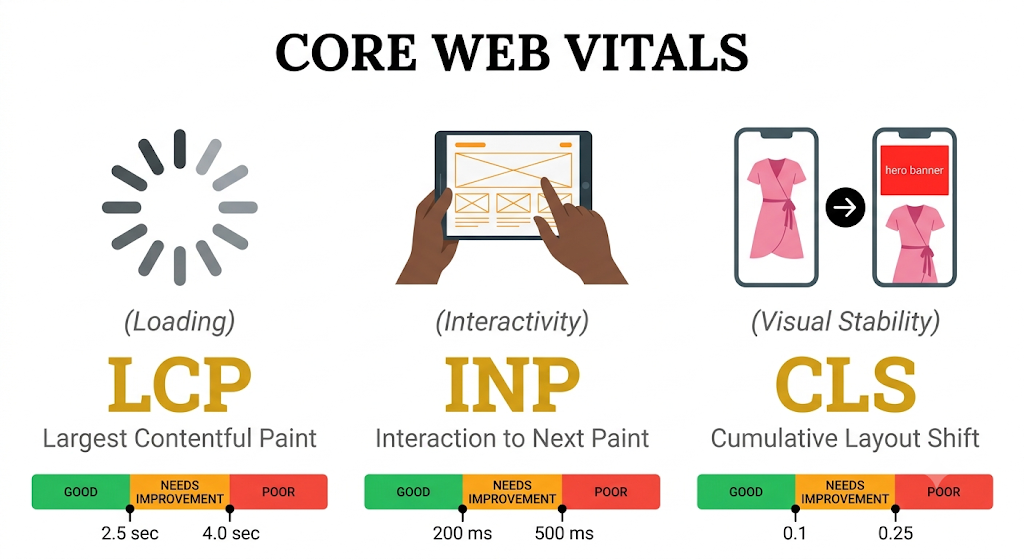
Largest Contentful Paint (LCP): Measuring Page Loading Speed
Largest Contentful Paint (LCP) is a Core Web Vitals metric that tracks how long it takes for the largest visual element on a web page to render fully in the viewport. This main element is typically a hero banner, a featured image, or a large block of heading text. To provide a satisfactory experience, Google recommends aiming for an LCP of 2.5 seconds or faster.
Common issues like heavy media files, slow server response times, and render-blocking resources often drag down this score. Optimising images for web delivery by compressing files or serving modern formats like WebP is one of the quickest ways to improve your LCP timing.
Interaction to Next Paint (INP): Measuring Page Responsiveness
Interaction to Next Paint (INP) is a Core Web Vitals metric that assesses a page’s overall responsiveness by measuring the delay between a user click, tap, or key press and the resulting visual update on screen. Replacing the older First Input Delay (FID) metric in early 2024, INP evaluates latency throughout the entire duration of a user’s visit rather than just the first interaction. A good INP score requires a delay of 200 milliseconds or less.
High INP scores usually stem from heavy JavaScript execution time and prolonged main thread blocking, which prevents the browser’s rendering engine from updating the display promptly.
Cumulative Layout Shift (CLS): Measuring Visual Stability
Cumulative Layout Shift (CLS) is a Core Web Vitals metric that quantifies the unexpected movement of page elements while content continues to load. Unintended shifts often occur when images load without set dimensions, late-loading ads inject themselves into the layout, or dynamic fonts resize on the fly. Google states that a good CLS metric should remain at 0.1 or lower to protect visitors from misclicks.
Establishing fixed width and height attributes on images and reserving containers for dynamic content prevents unstable layouts and shifting elements from frustrating your visitors.
How Core Web Vitals Help in SEO
Core Web Vitals help in SEO by serving as an official lightweight ranking signal that rewards fast, responsive, and visually stable web pages in Google search results. When two competing pages offer equally high-quality content and relevance for a search query, Google uses page experience signals to determine which URL ranks higher. However, improving these metrics delivers value far beyond search engine position adjustments.
Beyond direct search rankings, fixing performance issues creates a healthier site overall. Fast-loading pages directly reduce bounce rate and site speed drop-offs, keeping readers on your pages longer. Improving interactive responsiveness improves conversions for e-commerce stores and lead generation forms. A technical foundation built on optimised user experience establishes strong topical authority and keeps audiences coming back to your site.
What Are Field Data and Lab Data?
Field Data and Lab Data represent two distinct methodologies for gathering site speed metrics, differing in how, where, and from whom performance data is collected. Field data collects real-world measurements from actual visitors navigating your website under natural conditions. Lab data collects simulated metrics using automated scripts running in a controlled testing environment with predefined device setups.
➲ Field Data: Real-World Experience Metrics
Field Data is real-user performance data collected from actual human visits to your web pages over time. Google gathers this real-world performance information through the Chrome User Experience Report (CrUX), aggregating metrics from signed-in Chrome users across diverse mobile devices, desktops, and connection speeds.
Because it captures true operational conditions, Google relies exclusively on field data to determine whether your site passes or fails Core Web Vitals benchmarks for ranking purposes.
➲ Lab Data: Synthetic Diagnostic Metrics
Lab Data is synthetic performance measurements generated inside controlled testing tools under standardised network conditions. Using automated instruments like Google’s Lighthouse tool, web developers run lab tests to catch performance bottlenecks, test code fixes locally, and measure potential speed issues before deploying changes live.
While lab metrics excel at debugging specific code issues, they cannot fully replicate real-world user behaviours or unpredictable network speeds.
Ways to See Core Web Vitals Metrics for Your Site
Checking your website’s performance metrics requires free, beginner-friendly diagnosis tools provided directly by Google. Whether you want an overall diagnostic overview of your domain or a quick real-time audit of an individual URL, these accessible tools make analysing page performance simple.
➲ Google PageSpeed Insights
PageSpeed Insights is a free web tool created by Google that analyses the speed and user experience of individual web pages on both mobile and desktop platforms. By simply pasting a URL into the search bar, the tool generates a detailed breakdown of both real-world field data and diagnostic lab data.
The report highlights your specific performance tier—categorised into Good vs Needs Improvement vs Poor scores—and offers step-by-step recommendations for clearing out render-blocking scripts and optimising media assets.
➲ Google Search Console Core Web Vitals Report
The Google Search Console Core Web Vitals report is a sitewide technical dashboard that groups your site’s URLs by performance status based on real-world field metrics. Unlike single-page tools, this console report reviews your entire domain simultaneously, categorising your pages as “Good,” “Needs Improvement,” or “Poor.”
It highlights systemic issues across thousands of URLs at once, helping site owners spot shared code performance failures across entire post categories or page types.
➲ Google Chrome Developer Tools & Extensions
Google Chrome Developer Tools are built-in browser options that allow creators to test speed, debug scripts, and view layout stability in real time. By right-clicking any webpage, choosing “Inspect,” and opening the “Lighthouse” or “Performance” tab, you can generate comprehensive performance diagnostic runs directly within your local browser session.
Additionally, installing the Web Vitals Chrome Extension allows beginners to see real-time LCP, INP, and CLS performance readouts right on the page while browsing their website. For site creators running popular content management systems, utilising verified Core Web Vitals plugins for WordPress offers an easy path toward automated asset optimisation and caching.
Conclusion
Mastering Core Web Vitals doesn’t require you to become a full-time web developer overnight. By understanding how Largest Contentful Paint (LCP), Interaction to Next Paint (INP), and Cumulative Layout Shift (CLS) shape real user experience, you can systematically remove speed bottlenecks and keep visitors engaged on your site.
Frequently Asked Questions (FAQ)
Q1. What are core web vitals in simple terms?
➢ Core Web Vitals are three simple performance benchmarks set by Google to measure how fast, responsive, and visually stable a web page is for real visitors. They measure loading speed (LCP), interactive delay (INP), and visual layout shifts (CLS).
Q2. Do core web vitals directly affect search engine rankings?
➢ Yes, Core Web Vitals are an official search ranking signal within Google’s page experience signals framework. While high-quality content remains the most important factor, fast and stable web pages receive a ranking boost over slower competing websites.
Q3. What is the difference between FID and INP?
➢ First Input Delay (FID) measured only the latency of a visitor’s very first interaction on a web page. Interaction to Next Paint (INP) replaced FID in March 2024 to measure responsiveness across all user clicks, taps, and key presses throughout the entire duration of a page visit.
Q4. How do I check core web vitals for free?
➢ You can test your website speed for free using Google PageSpeed Insights, viewing the Core Web Vitals report inside Google Search Console, or using the built-in Lighthouse tool within Chrome Developer Tools.
Q5. What is a good score for core web vitals?
➢ A good score requires an LCP of 2.5 seconds or less, an INP of 200 milliseconds or less, and a CLS of 0.1 or lower. To pass Google’s overall test, at least 75% of your total web page visits must meet these targets.